MTC Density · Photoshop plugin
MTC Density: color density, subtractive saturation and hue
MTC Density is a groundbreaking plugin for Adobe Photoshop, designed to integrate high-level color techniques into the photographic workflow—techniques previously reserved for cinema professionals. By adjusting color density, subtractive saturation, and hue, it allows users to achieve images with the depth and richness characteristic of traditional analog methods.
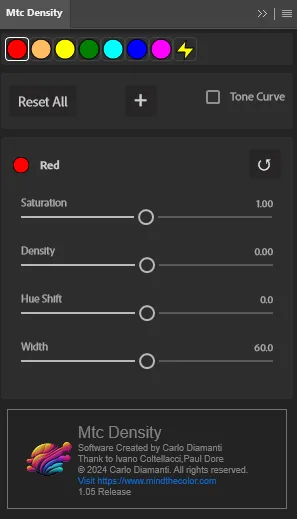
A key feature of MTC Density is its control over color density, which reduces the brightness of a tone without affecting its saturation, giving it more "visual weight" while maintaining the overall harmony of the image. Complementing this is subtractive saturation, inspired by classic photographic processes, which enhances colors without expanding the RGB channels, ensuring a softer and more realistic color gradient.
Attempting to recreate these effects using only Photoshop’s built-in tools can be complex, as it requires meticulous use of curves, layers, and masks—often resulting in inconsistent outcomes across different images.
MTC Density greatly simplifies this workflow by providing dedicated sliders and real-time controls to precisely adjust six primary colors (red, green, blue, cyan, magenta, yellow) as well as skin tones. Additionally, its advanced interpolation algorithm minimizes artifacts and ensures much smoother color transitions.
For those seeking a truly cinematic look, MTC Density also includes a tonal curve that mimics the response of traditional film negatives, delivering a distinctive contrast and color gradation.
Another key feature of MTC Density is its ability to store metadata directly within Photoshop layers. This allows users to save and reload all settings with a simple layer click, making it possible to re-edit the effect at any time and significantly streamline the workflow.
In conclusion, MTC Density is the ideal choice for photographers, retouchers, digital artists, and post-production professionals who seek advanced control over color rendering, inspired by the depth and softness of analog systems. With its dedicated tools and cinema-grade approach, it transforms the creation of images with unprecedented color quality into a powerful and intuitive creative process.
Video tutorials
Density in action
This video is hosted on YouTube. To play it here, YouTube needs your consent to its cookies.
Licences
Density on its own or in the complete bundle
MTC Density
The complete plugin for anyone who wants to purchase this tool individually.
Personal licence linked to your Adobe Creative Cloud account.
- Color density, subtractive saturation and hue control
- Dedicated controls for red, yellow, green, cyan, blue, magenta and skin tones
- Interpolation designed to preserve smooth chromatic transitions
- A tonal curve inspired by the response of photographic negative film
- Real-time controls and settings that can be recalled from the Photoshop document
- Free updates throughout the 1.x series
- No workstation limit when using the same Adobe Creative Cloud account
- Manual available in English and Italian
Requires Adobe Photoshop 25.9 or later on macOS or Windows, with Creative Cloud Desktop installed and up to date. An Internet connection is required for authentication and licence verification.
Complete bundle
Density, MindTheColor 3 and ChromaWarp together.
- MTC Density €69
- MindTheColor 3 €179
- MTC ChromaWarp €89
- Bought separately €337
Frequently asked questions
FAQ - MTC Density
Answers to the most common questions about Density installation, licensing, compatibility and use.
What is MTC Density?
MTC Density is an Adobe Photoshop plugin for controlling color density, subtractive saturation and hue. It provides dedicated real-time controls and an analog-inspired approach to color rendering.
Is it suitable for beginners?
Yes. MTC Density is an advanced tool while remaining simple and intuitive to use. Its main controls make it possible to begin working quickly even without extensive knowledge of more complex techniques.
What are the requirements?
Adobe Photoshop 25.9 or later on macOS or Windows, with Adobe Creative Cloud Desktop installed and up to date. The computer must meet the requirements of the Photoshop version being used.
Does it work on Apple Silicon Macs?
Yes. MTC Density is a UXP plugin and is compatible with Apple Silicon Macs that meet the requirements of the Photoshop version being used.
Is there a trial version?
No. A trial version is not available. You can consult the product page and user manual to understand how MTC Density works before purchasing.
What do I receive after purchase?
You receive an email containing the software download link and your licence serial. MTC Density is supplied as a .ccx file and installs through Adobe Creative Cloud Desktop. Once installed, it is available from Photoshop's Plugin menu.
Can I request a refund?
No. MTC Density is a digital product and, once the purchase has been completed, the licence is non-refundable.
How many computers can I use it on?
The licence does not limit the number of workstations, provided they all use the licence holder's same Adobe Creative Cloud account. Changing computer while keeping the same Adobe account does not require a new licence.
Can I change my Adobe account?
If you need to replace your Adobe Creative Cloud account, contact licence support before proceeding. The licence remains personal and cannot be transferred to another user.
support@mtclicense.comIs an Internet connection required?
Yes. An Internet connection is required for authentication and licence verification. If the online verification cannot be completed, the plugin cannot be activated.
What is the update policy?
All updates within the MTC Density 1.x series are free. A future move to a new major release, such as MTC Density 2, may be offered as a paid upgrade.
Is a user manual available?
Yes. The manual is available in both English and Italian from the same download area as MTC Density.
Are there dedicated terms for schools and academies?
Yes. A 30% discount is available for purchases of 5 licences or more. Contact us before purchasing to receive the dedicated terms.
mindthecolor2021@gmail.com